Viral Saree Collage Prompt For Beautiful Girls

Viral Saree Collage Prompt For Beautiful Girls  - AI Generated Image
AI Prompt Used

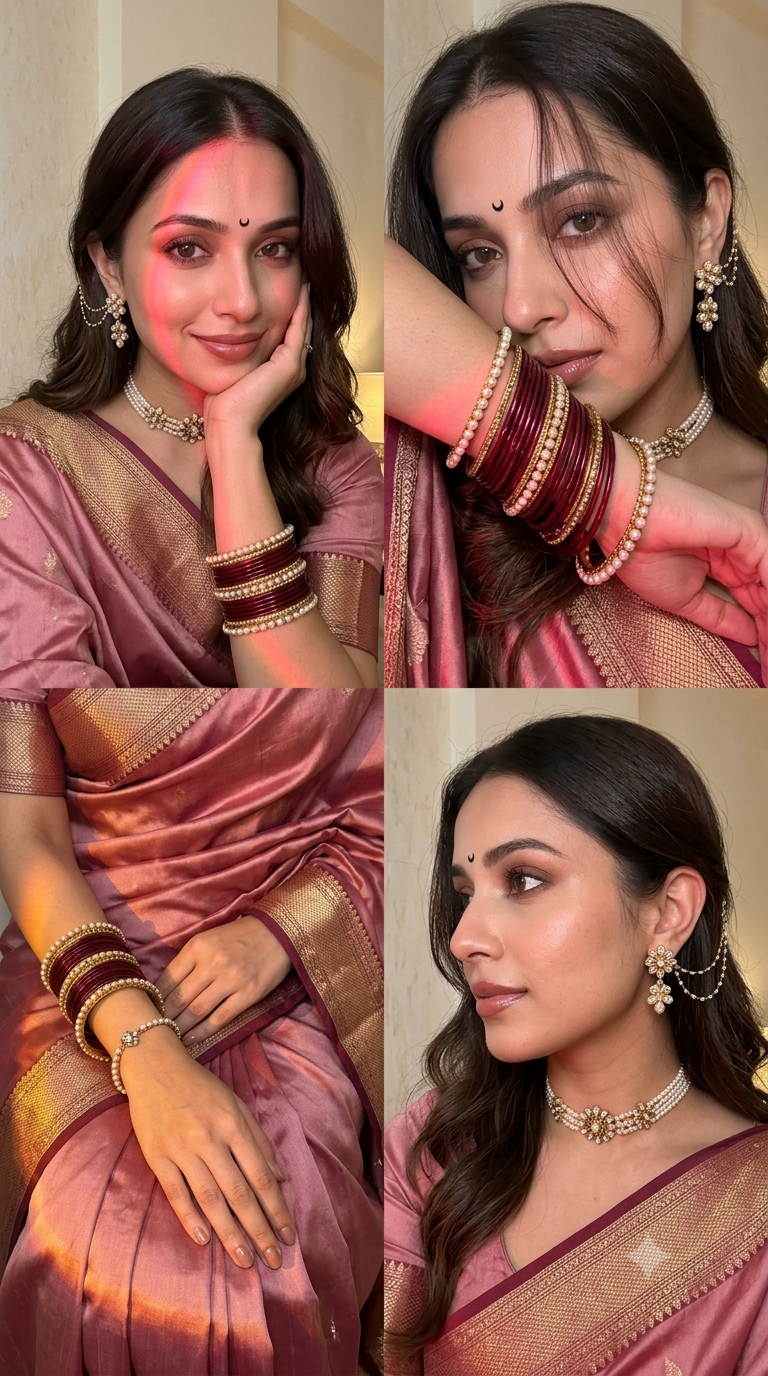
Ultra-realistic indoor iPhone 16 Pro front-camera selfie collage, 2×2 grid with four perfectly equal square frames, appearing exactly like naturally captured real-life selfies instead of AI-generated artwork. Absolute smartphone realism with authentic iPhone front camera optics, subtle sensor noise, delicate film grain, tiny handheld motion blur, slight autofocus softness, realistic JPEG compression, HDR turned off, no beauty mode, no skin smoothing, no over-sharpening, no artificial perfection. True-to-life skin texture with visible pores, baby hairs, peach fuzz, natural lip texture, tiny facial asymmetry, lifelike eye reflections, soft lens imperfections, realistic front-camera perspective. SUBJECT: A stunning young South Asian woman wearing a luxurious blush pink Banarasi silk saree with intricate antique gold zari borders and an elegant matching pink blouse. The saree drapes naturally with rich folds, premium silk texture, and soft luminous highlights that enhance its elegant pink hue. A tiny black crescent moon bindi perfectly centered on her forehead. Long dark brown hair styled in soft flowing waves with a clean middle part and loose face-framing strands. Fresh natural glam makeup featuring warm brown eyeshadow, ultra-thin eyeliner, naturally curled lashes, softly flushed cheeks, glowing healthy skin, glossy nude-rose lips. Accessories include an elegant pearl-and-antique-gold floral choker necklace, matching floral drop earrings with delicate ear chain connected to her hair, stacked maroon glass bangles mixed with gold kadas and pearl bracelets, a graceful bracelet on her wrist, and subtle rings. FRAME 1 (Top Left) Natural medium close-up selfie captured approximately 45 cm away. She gently rests her chin on her folded right hand while tilting her head slightly toward it. A soft closed-lip smile with warm expressive eyes looking directly into the camera. Left shoulder slightly forward with the silk saree gracefully draped. Background features a softly textured cream wall. A vivid warm pink-red LED light streak falls diagonally across the forehead, left eye, nose, cheek and chin while the remaining face is illuminated by the natural iPhone front flash. The lighting creates beautiful dimensionality and realistic facial contours. FRAME 2 (Top Right) Intimate close-up captured approximately 23 cm away. Her forearm gently covers her nose and lips, beautifully showcasing stacked maroon and gold bangles. Her eyes gaze slightly upward toward the left with a calm dreamy expression. Loose hair strands softly fall over her forehead. Jewelry sparkles naturally under the warm flash while pink-red reflections illuminate the bangles and lower face. FRAME 3 (Bottom Left) Beautiful close-up from above showing both hands gracefully resting on her lap over the luxurious silk saree. The rich maroon fabric, shimmering zari border, elegant bangles, delicate bracelet, and natural hand pose become the primary focus. A soft golden-orange LED light washes gently across the wrists and saree folds, creating rich highlights and realistic silk reflections. Fingernails are short with glossy nude polish. Everything feels elegant, minimal and naturally luxurious. FRAME 4 (Bottom Right) Close-up side profile captured approximately 30 cm away. The composition highlights her ear jewelry, floral ear chain, graceful jawline, neck, pearl choker and embroidered saree border. Hair tucked neatly behind the ear revealing intricate jewelry details. Her head turns naturally away from the camera creating an authentic candid moment. Warm flash lighting produces realistic metallic reflections and soft shadows beneath the chin. LIGHTING Primary lighting comes entirely from the genuine iPhone 16 Pro front flash combined with warm ambient indoor lamp lighting. Strong cinematic pink-red LED light streaks illuminate the first two frames, rich golden-orange light enhances the third frame, while the fourth frame features soft warm neutral lighting. Gentle highlight roll-off, realistic skin reflections, subtle shadows beneath the chin, nose and loose hair strands. Jewelry catches realistic specular highlights without appearing overexposed. No studio lighting. BACKGROUND Minimal cozy indoor environment with lightly textured cream and beige walls. Naturally shallow depth created only by smartphone optics. Soft warm atmosphere with uncluttered surroundings. Realistic indoor ambience with authentic household lighting. CAMERA Captured using a genuine iPhone 16 Pro front camera (26 mm equivalent ultra-wide selfie lens). Natural handheld framing with believable arm-length distance. Authentic selfie perspective with slight wide-angle distortion typical of smartphone front cameras. No cinematic portrait mode, no artificial depth effect. COLOR Warm amber skin tones, soft rose highlights, subtle magenta reflections, rich maroon silk, deep antique gold accents, creamy neutral background, balanced white balance, slightly lifted blacks, soft contrast, natural saturation, premium smartphone color science without teal-orange grading. QUALITY Looks completely indistinguishable from authentic casual iPhone selfies captured by a real person indoors. Ultra-photorealistic smartphone photography with tiny sensor grain, natural handheld imperfections, realistic compression artifacts, believable lighting, lifelike skin, premium fabric texture, authentic reflections, and genuine front-camera realism. Absolutely no AI-generated appearance, no digital painting effect, no unrealistic perfection. Aspect Ratio: 9:16 Make Sure Use 100% Face Same I want pink saree in this prompt
Click or tap to copy

About This AI Prompt

Viral Saree Collage Prompt For Beautiful Girls Whether you use ChatGPT, Gemini, Grok, Midjourney, or other AI image generators, the right prompt can improve image quality, styling, lighting, and overall realism. From sarees and lehengas to ethnic suits, a detailed prompt brings your creative ideas to life. In this article, you’ll find a beautiful traditional outfit photo prompt that is easy to use and perfect for creating high-quality AI-generated images for social media, wallpapers, or personal projects.
AI Platform Comparison (32+ Models)

AI Photo Platform Comparison (32+ Models)

Choose from over 32 leading AI image platforms. Compare features, pricing, and best use cases:

Platform Best For Pricing Category Key Strength
Google Imagen 3 Recommended Photorealistic images, product visualization Free/Paid tiers professional photorealistic
DALL-E 3 Artistic creations, marketing visuals Credits system professional prompt accuracy
Midjourney V6 Digital art, concept art, fantasy Paid subscription artistic artistic styles
Stable Diffusion 3 Custom models, research, local generation Free/Paid open-source open-source
Adobe Firefly Image Commercial projects, design work Adobe subscription professional commercial safe
Leonardo Creative Professional art, commercial projects Token system professional style consistency
Ideogram 2.0 Graphic design, text-heavy images Free/Paid design typography
Canva AI Social media graphics, presentations Free/Pro design templates
Playground AI V2 Creative exploration, experimentation Free/Paid creative fine-tuning
Runway Image Generation Multi-modal projects, video+image Subscription professional integration
NightCafe Creator Artistic exploration, community engagement Credit system artistic multiple algorithms
Wombo Dream Mobile creation, quick art Free/Paid mobile mobile
Getty Generative AI Commercial use, licensed content Paid commercial legal protection
Craiyon V3 Quick testing, casual use Free free completely free
Bing Image Creator Free generation, quick results Free free free DALL-E

Quick recommendations:

  • For professionals: Google Imagen 3, DALL-E 3, Midjourney V6
  • For designers: Adobe Firefly, Canva AI, Leonardo Creative
  • For commercial use: Getty Generative, Shutterstock AI, Adobe Firefly
  • For open source: Stable Diffusion 3, SDXL, SDXL Turbo
  • For free: Craiyon V3, Bing Creator, BlueWillow V4
  • For mobile: Wombo Dream, StarryAI, Picsart AI

Top AI Image Generation Tools

Google Imagen 3

Google's most advanced text-to-image model with photorealistic quality

photorealisticdetailed renderingtext integration

DALL-E 3

OpenAI's leading image generation model with exceptional prompt comprehension

prompt accuracycreative compositiondetail

Midjourney V6

Premium artistic image generation with unparalleled style control

artistic stylescompositioncommunity

Stable Diffusion 3

Latest open-source image generation with improved quality and control

open-sourcefine-tuningcontrol

Adobe Firefly Image

Adobe's commercial-safe image generation with Creative Cloud integration

commercial safeAdobe integrationprofessional

Leonardo Creative

Professional art generation with style consistency

style consistencyprofessionalcommercial

Model-Specific Optimization Tips

Model-Specific Optimization

Midjourney
  • Use --ar 16:9 for widescreen, --ar 9:16 for mobile
  • --style raw for less opinionated, --style expressive for artistic
  • --chaos 0-100 controls variation (higher = more diverse)
  • --stylize 100-1000 adjusts artistic interpretation
Stable Diffusion
  • CFG Scale: 7-12 (balance between creativity and prompt adherence)
  • Sampling Steps: 20-50 (higher = more detailed but slower)
  • Negative prompts: Essential for removing unwanted elements
  • Use (keyword:1.3) for emphasis, [keyword] for de-emphasis
Google Gemini/Imagen
  • Use natural, conversational language
  • Include context and background information
  • Ask for multiple variations in one request
  • Use follow-up questions for refinements
Adobe Firefly
  • Specify commercial-safe content requirements
  • Use Adobe Stock references for consistency
  • Integrate with Creative Cloud workflows
  • Use style presets for quick professional results
Runway ML / Pika
  • Specify exact duration (3-10 seconds) for optimal results
  • Describe camera movements: "smooth zoom", "pan left", "dolly in"
  • Include motion descriptors: "fluid", "dynamic", "cinematic"
  • Mention transitions between scenes for complex videos
CapCut / InVideo
  • Use templates as starting points for faster production
  • Combine AI generation with stock footage for variety
  • Add AI voiceovers for narration and storytelling
  • Export in platform-specific formats (9:16 for Reels/Shorts)

How To Use This Prompt

1
Access the Platform: Access Google Imagen 3 through Google AI Studio or Vertex AI platform.
2
Prepare Your Input: Start with a clear concept. Consider the style, composition, and mood you want to achieve.
3
Use Your Prompt: Use this prompt: "Ultra-realistic indoor iPhone 16 Pro front-camera selfie collage, 2×2 grid with four perfectly equal square frames, appearing exactly like naturally captured real-life selfies instead of AI-generated artwork. Absolute smartphone realism with authentic iPhone front camera optics, subtle sensor noise, delicate film grain, tiny handheld motion blur, slight autofocus softness, realistic JPEG compression, HDR turned off, no beauty mode, no skin smoothing, no over-sharpening, no artificial perfection. True-to-life skin texture with visible pores, baby hairs, peach fuzz, natural lip texture, tiny facial asymmetry, lifelike eye reflections, soft lens imperfections, realistic front-camera perspective. SUBJECT: A stunning young South Asian woman wearing a luxurious blush pink Banarasi silk saree with intricate antique gold zari borders and an elegant matching pink blouse. The saree drapes naturally with rich folds, premium silk texture, and soft luminous highlights that enhance its elegant pink hue. A tiny black crescent moon bindi perfectly centered on her forehead. Long dark brown hair styled in soft flowing waves with a clean middle part and loose face-framing strands. Fresh natural glam makeup featuring warm brown eyeshadow, ultra-thin eyeliner, naturally curled lashes, softly flushed cheeks, glowing healthy skin, glossy nude-rose lips. Accessories include an elegant pearl-and-antique-gold floral choker necklace, matching floral drop earrings with delicate ear chain connected to her hair, stacked maroon glass bangles mixed with gold kadas and pearl bracelets, a graceful bracelet on her wrist, and subtle rings. FRAME 1 (Top Left) Natural medium close-up selfie captured approximately 45 cm away. She gently rests her chin on her folded right hand while tilting her head slightly toward it. A soft closed-lip smile with warm expressive eyes looking directly into the camera. Left shoulder slightly forward with the silk saree gracefully draped. Background features a softly textured cream wall. A vivid warm pink-red LED light streak falls diagonally across the forehead, left eye, nose, cheek and chin while the remaining face is illuminated by the natural iPhone front flash. The lighting creates beautiful dimensionality and realistic facial contours. FRAME 2 (Top Right) Intimate close-up captured approximately 23 cm away. Her forearm gently covers her nose and lips, beautifully showcasing stacked maroon and gold bangles. Her eyes gaze slightly upward toward the left with a calm dreamy expression. Loose hair strands softly fall over her forehead. Jewelry sparkles naturally under the warm flash while pink-red reflections illuminate the bangles and lower face. FRAME 3 (Bottom Left) Beautiful close-up from above showing both hands gracefully resting on her lap over the luxurious silk saree. The rich maroon fabric, shimmering zari border, elegant bangles, delicate bracelet, and natural hand pose become the primary focus. A soft golden-orange LED light washes gently across the wrists and saree folds, creating rich highlights and realistic silk reflections. Fingernails are short with glossy nude polish. Everything feels elegant, minimal and naturally luxurious. FRAME 4 (Bottom Right) Close-up side profile captured approximately 30 cm away. The composition highlights her ear jewelry, floral ear chain, graceful jawline, neck, pearl choker and embroidered saree border. Hair tucked neatly behind the ear revealing intricate jewelry details. Her head turns naturally away from the camera creating an authentic candid moment. Warm flash lighting produces realistic metallic reflections and soft shadows beneath the chin. LIGHTING Primary lighting comes entirely from the genuine iPhone 16 Pro front flash combined with warm ambient indoor lamp lighting. Strong cinematic pink-red LED light streaks illuminate the first two frames, rich golden-orange light enhances the third frame, while the fourth frame features soft warm neutral lighting. Gentle highlight roll-off, realistic skin reflections, subtle shadows beneath the chin, nose and loose hair strands. Jewelry catches realistic specular highlights without appearing overexposed. No studio lighting. BACKGROUND Minimal cozy indoor environment with lightly textured cream and beige walls. Naturally shallow depth created only by smartphone optics. Soft warm atmosphere with uncluttered surroundings. Realistic indoor ambience with authentic household lighting. CAMERA Captured using a genuine iPhone 16 Pro front camera (26 mm equivalent ultra-wide selfie lens). Natural handheld framing with believable arm-length distance. Authentic selfie perspective with slight wide-angle distortion typical of smartphone front cameras. No cinematic portrait mode, no artificial depth effect. COLOR Warm amber skin tones, soft rose highlights, subtle magenta reflections, rich maroon silk, deep antique gold accents, creamy neutral background, balanced white balance, slightly lifted blacks, soft contrast, natural saturation, premium smartphone color science without teal-orange grading. QUALITY Looks completely indistinguishable from authentic casual iPhone selfies captured by a real person indoors. Ultra-photorealistic smartphone photography with tiny sensor grain, natural handheld imperfections, realistic compression artifacts, believable lighting, lifelike skin, premium fabric texture, authentic reflections, and genuine front-camera realism. Absolutely no AI-generated appearance, no digital painting effect, no unrealistic perfection. Aspect Ratio: 9:16 Make Sure Use 100% Face Same I want pink saree in this prompt"
4
Customize Details: Use detailed descriptions, include lighting and composition terms
5
Generate and Refine: Generate and review results. Request variations or make specific edits as needed.
6
Finalize and Export: Download your preferred result in your chosen resolution.

Expert Tips for Best Results

  • Be descriptive: Use specific, detailed language rather than vague terms
  • Include artistic references: "in the style of [artist], [art movement]"
  • Specify lighting and composition: "dramatic lighting, rule of thirds"
  • Use quality modifiers: "highly detailed, 8k resolution, professional"
  • Use weighted prompts: "(keyword:1.3)" to emphasize elements
  • Experiment with different aspect ratios for various platforms
  • Use negative prompts extensively to exclude unwanted elements
  • Save successful seeds for consistent style reproduction
  • Use image prompts with URLs for style reference
  • Iterate systematically: Make small, specific changes between generations

Usage Tips

  • Experiment with different art styles and mediums mentioned in the prompt
  • Adjust parameters like aspect ratio, style, and quality settings
  • Use style references for more consistent results
  • Try varying the chaos/stylize parameters for more creative variations
  • Combine with other prompts for hybrid styles
  • Specify camera types and lenses for different photographic effects
  • Use lighting terms like "golden hour" or "studio lighting"
  • Include depth of field requirements for focus control
  • Test the prompt across different AI platforms
  • Keep a log of successful variations and parameters

Optimization Tips

  • Use specific, descriptive language in your prompts for better AI understanding
  • Include relevant keywords like 'viral', 'saree' for targeted results
  • Experiment with different parameter combinations to optimize outputs
  • Save successful prompt variations for future reference and refinement
  • Stay updated with the latest AI model capabilities and limitations
You Might Like:

Comments

Add a Comment

Max 1000 characters. Your comment will be publicly visible.
Note: Your email will not be published. It's only used to display your Gravatar if you have one.

No comments yet. Be the first to share your thoughts!

Quick Unique Best Match
Loading home.promptseen...
10K Followers 10K Subscribers 10K Members
Uploaded preview
0 credits
Generated Image