Prompt Seen Raksha Bandhan Ai Prompt

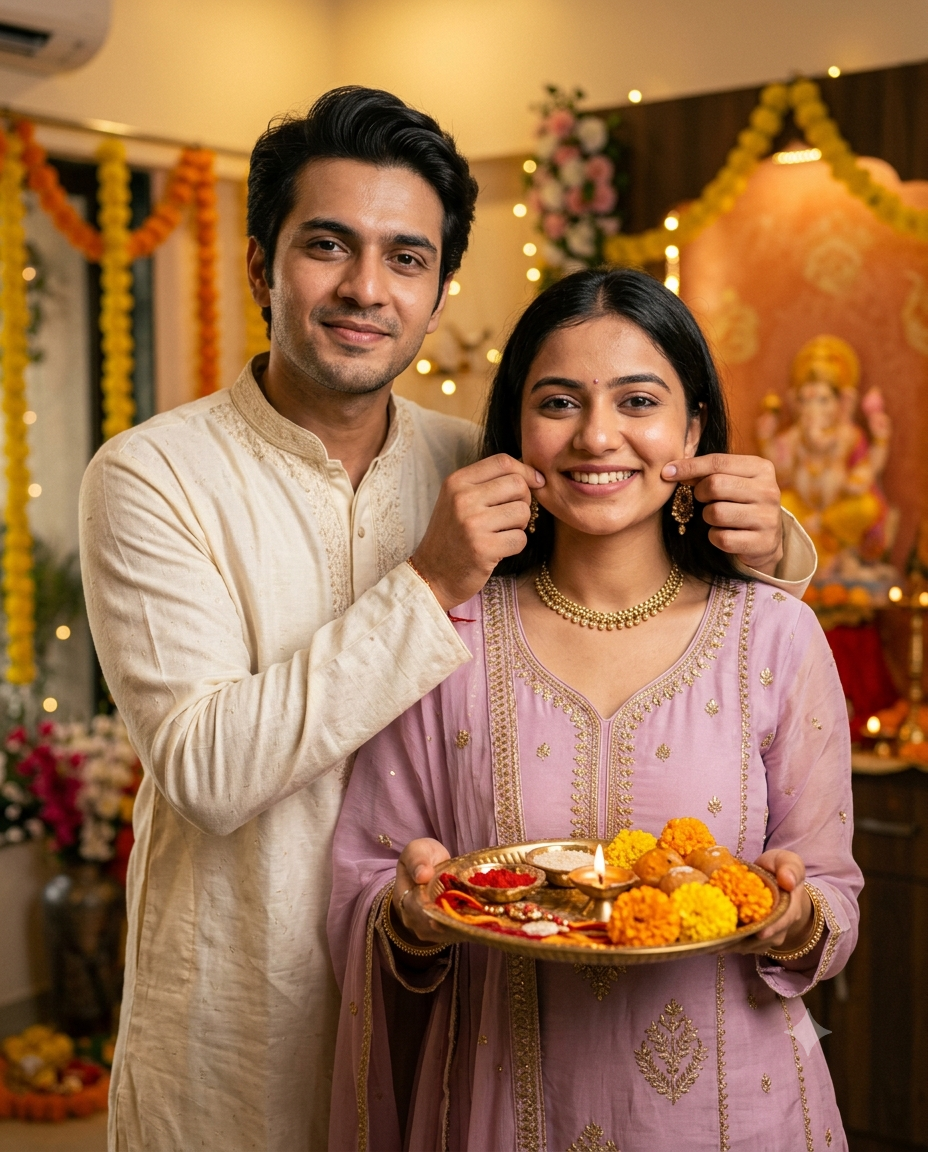
Prompt Seen Raksha Bandhan Ai Prompt - AI Generated Image
AI Prompt Used

Create an ultra-photorealistic, warm and candid Raksha Bandhan family portrait featuring the exact brother and sister from the provided reference images.IDENTITY LOCK — EXTREMELY IMPORTANT:Use the uploaded reference images as the strict identity references for both people. Preserve their exact facial identity, facial structure, eyes, eyebrows, nose, lips, jawline, skin tone, hairstyle, hair texture and natural features. Do not beautify, reshape, age, de-age, or replace their faces. They must look like the same real people from the reference photos.COMPOSITION & POSE:Create a natural close-to-medium vertical portrait. The brother stands slightly behind and to the left of his sister, leaning naturally toward her. He gently holds both sides of her cheeks with his hands in a playful, affectionate sibling gesture, creating a genuine Raksha Bandhan moment. The sister stands in front, looking directly at the camera with a soft natural smile while holding a traditional Raksha Bandhan pooja thali with both hands.The brother has a relaxed, affectionate expression and looks naturally toward the camera. Keep the pose candid and realistic, with anatomically correct hands, fingers and arms.CLOTHING:Brother wearing an elegant traditional cream/off-white embroidered kurta with subtle intricate ethnic detailing.Sister wearing a beautiful pastel lavender/pink traditional Indian outfit with delicate golden embroidery, matching dupatta and elegant traditional jewellery. Keep the styling graceful, festive and realistic.RAKSHA BANDHAN THALI:The sister is holding a beautifully decorated traditional brass/golden pooja thali containing colorful rakhi threads, roli/kumkum, rice grains, small traditional bowls, sweets, marigold flowers, rose petals and a lit diya. The diya should produce a soft natural warm glow.BACKGROUND & FESTIVE DECORATION:Set the scene inside a beautifully decorated Indian home during Raksha Bandhan. Warm cream/beige interior walls decorated with hanging marigold flower garlands in yellow and orange, subtle festive floral decorations, small warm fairy lights and a traditional pooja setup in the background with a softly visible Hindu deity idol.Keep the background naturally blurred with realistic shallow depth of field so the brother and sister remain the clear focus.LIGHTING:Warm golden indoor festive lighting, soft diffused key light on both faces, natural skin highlights, gentle diya glow, subtle warm bokeh from fairy lights, balanced exposure and clean facial illumination. Faces must remain bright and clearly visible without becoming too dark or overexposed.PHOTOGRAPHY STYLE:Ultra-photorealistic professional DSLR photography, natural skin texture, realistic pores, authentic hair strands, realistic fabric texture, accurate jewelry details, cinematic depth of field, 50mm portrait lens, f/2.0–f/2.8, soft background bokeh, premium dynamic range, subtle cinematic color grading, warm Indian festive atmosphere, realistic shadows and reflections.FRAMING:Vertical 4:5 portrait composition, brother and sister centered in frame, enough space around their heads, thali fully visible in the lower portion, natural perspective, no unnecessary cropping.QUALITY & REALISM:Photorealistic, highly detailed, natural candid family photography, realistic anatomy, realistic hands and fingers, authentic Indian festive environment, premium professional photography, high dynamic range, sharp faces, soft background separation.NEGATIVE PROMPT:cartoon, anime, illustration, CGI look, plastic skin, artificial face, altered identity, face swap artifacts, beauty filter, excessive skin smoothing, distorted face, asymmetrical eyes, extra fingers, missing fingers, malformed hands, extra arms, duplicate people, unnatural pose, unrealistic jewelry, oversaturated colors, harsh lighting, dark faces, blurry faces, low resolution, excessive HDR, fake bokeh, warped thali, cropped hands, text, watermark, logo.
Click or tap to copy

About This AI Prompt

Rakhi photography is no longer limited to simple snapshots; while many people traditionally view Raksha Bandhan photos merely as images of the actual tying of the Rakhi, AI-generated imagery allows for the creation of a complete visual story. Imagine sitting in a traditional Indian-style room with a puja thali (worship platter) placed before you as the Rakhi is being tied; the scene features floral decorations and a soft, blurred background reminiscent of a professional photoshoot. This is why, by using the right prompts today, you can easily create professional-quality photos.
AI Platform Comparison (32+ Models)

AI Photo Platform Comparison (32+ Models)

Choose from over 32 leading AI image platforms. Compare features, pricing, and best use cases:

Platform Best For Pricing Category Key Strength
Google Imagen 3 Photorealistic images, product visualization Free/Paid tiers professional photorealistic
DALL-E 3 Artistic creations, marketing visuals Credits system professional prompt accuracy
Midjourney V6 Digital art, concept art, fantasy Paid subscription artistic artistic styles
Stable Diffusion 3 Custom models, research, local generation Free/Paid open-source open-source
Adobe Firefly Image Commercial projects, design work Adobe subscription professional commercial safe
Leonardo Creative Professional art, commercial projects Token system professional style consistency
Ideogram 2.0 Graphic design, text-heavy images Free/Paid design typography
Canva AI Social media graphics, presentations Free/Pro design templates
Playground AI V2 Creative exploration, experimentation Free/Paid creative fine-tuning
Runway Image Generation Multi-modal projects, video+image Subscription professional integration
NightCafe Creator Artistic exploration, community engagement Credit system artistic multiple algorithms
Wombo Dream Mobile creation, quick art Free/Paid mobile mobile
Getty Generative AI Commercial use, licensed content Paid commercial legal protection
Craiyon V3 Quick testing, casual use Free free completely free
Bing Image Creator Free generation, quick results Free free free DALL-E

Quick recommendations:

  • For professionals: Google Imagen 3, DALL-E 3, Midjourney V6
  • For designers: Adobe Firefly, Canva AI, Leonardo Creative
  • For commercial use: Getty Generative, Shutterstock AI, Adobe Firefly
  • For open source: Stable Diffusion 3, SDXL, SDXL Turbo
  • For free: Craiyon V3, Bing Creator, BlueWillow V4
  • For mobile: Wombo Dream, StarryAI, Picsart AI

Top AI Image Generation Tools

Google Imagen 3

Google's most advanced text-to-image model with photorealistic quality

photorealisticdetailed renderingtext integration

DALL-E 3

OpenAI's leading image generation model with exceptional prompt comprehension

prompt accuracycreative compositiondetail

Midjourney V6

Premium artistic image generation with unparalleled style control

artistic stylescompositioncommunity

Stable Diffusion 3

Latest open-source image generation with improved quality and control

open-sourcefine-tuningcontrol

Adobe Firefly Image

Adobe's commercial-safe image generation with Creative Cloud integration

commercial safeAdobe integrationprofessional

Leonardo Creative

Professional art generation with style consistency

style consistencyprofessionalcommercial

Model-Specific Optimization Tips

Model-Specific Optimization

Midjourney
  • Use --ar 16:9 for widescreen, --ar 9:16 for mobile
  • --style raw for less opinionated, --style expressive for artistic
  • --chaos 0-100 controls variation (higher = more diverse)
  • --stylize 100-1000 adjusts artistic interpretation
Stable Diffusion
  • CFG Scale: 7-12 (balance between creativity and prompt adherence)
  • Sampling Steps: 20-50 (higher = more detailed but slower)
  • Negative prompts: Essential for removing unwanted elements
  • Use (keyword:1.3) for emphasis, [keyword] for de-emphasis
Google Gemini/Imagen
  • Use natural, conversational language
  • Include context and background information
  • Ask for multiple variations in one request
  • Use follow-up questions for refinements
Adobe Firefly
  • Specify commercial-safe content requirements
  • Use Adobe Stock references for consistency
  • Integrate with Creative Cloud workflows
  • Use style presets for quick professional results
Runway ML / Pika
  • Specify exact duration (3-10 seconds) for optimal results
  • Describe camera movements: "smooth zoom", "pan left", "dolly in"
  • Include motion descriptors: "fluid", "dynamic", "cinematic"
  • Mention transitions between scenes for complex videos
CapCut / InVideo
  • Use templates as starting points for faster production
  • Combine AI generation with stock footage for variety
  • Add AI voiceovers for narration and storytelling
  • Export in platform-specific formats (9:16 for Reels/Shorts)

How To Use This Prompt

1
Access the Platform: Access Midjourney Niji through Discord with --niji parameter.
2
Prepare Your Input: Start with a clear concept. Consider the style, composition, and mood you want to achieve.
3
Use Your Prompt: Use this prompt: "Create an ultra-photorealistic, warm and candid Raksha Bandhan family portrait featuring the exact brother and sister from the provided reference images.IDENTITY LOCK — EXTREMELY IMPORTANT:Use the uploaded reference images as the strict identity references for both people. Preserve their exact facial identity, facial structure, eyes, eyebrows, nose, lips, jawline, skin tone, hairstyle, hair texture and natural features. Do not beautify, reshape, age, de-age, or replace their faces. They must look like the same real people from the reference photos.COMPOSITION & POSE:Create a natural close-to-medium vertical portrait. The brother stands slightly behind and to the left of his sister, leaning naturally toward her. He gently holds both sides of her cheeks with his hands in a playful, affectionate sibling gesture, creating a genuine Raksha Bandhan moment. The sister stands in front, looking directly at the camera with a soft natural smile while holding a traditional Raksha Bandhan pooja thali with both hands.The brother has a relaxed, affectionate expression and looks naturally toward the camera. Keep the pose candid and realistic, with anatomically correct hands, fingers and arms.CLOTHING:Brother wearing an elegant traditional cream/off-white embroidered kurta with subtle intricate ethnic detailing.Sister wearing a beautiful pastel lavender/pink traditional Indian outfit with delicate golden embroidery, matching dupatta and elegant traditional jewellery. Keep the styling graceful, festive and realistic.RAKSHA BANDHAN THALI:The sister is holding a beautifully decorated traditional brass/golden pooja thali containing colorful rakhi threads, roli/kumkum, rice grains, small traditional bowls, sweets, marigold flowers, rose petals and a lit diya. The diya should produce a soft natural warm glow.BACKGROUND & FESTIVE DECORATION:Set the scene inside a beautifully decorated Indian home during Raksha Bandhan. Warm cream/beige interior walls decorated with hanging marigold flower garlands in yellow and orange, subtle festive floral decorations, small warm fairy lights and a traditional pooja setup in the background with a softly visible Hindu deity idol.Keep the background naturally blurred with realistic shallow depth of field so the brother and sister remain the clear focus.LIGHTING:Warm golden indoor festive lighting, soft diffused key light on both faces, natural skin highlights, gentle diya glow, subtle warm bokeh from fairy lights, balanced exposure and clean facial illumination. Faces must remain bright and clearly visible without becoming too dark or overexposed.PHOTOGRAPHY STYLE:Ultra-photorealistic professional DSLR photography, natural skin texture, realistic pores, authentic hair strands, realistic fabric texture, accurate jewelry details, cinematic depth of field, 50mm portrait lens, f/2.0–f/2.8, soft background bokeh, premium dynamic range, subtle cinematic color grading, warm Indian festive atmosphere, realistic shadows and reflections.FRAMING:Vertical 4:5 portrait composition, brother and sister centered in frame, enough space around their heads, thali fully visible in the lower portion, natural perspective, no unnecessary cropping.QUALITY & REALISM:Photorealistic, highly detailed, natural candid family photography, realistic anatomy, realistic hands and fingers, authentic Indian festive environment, premium professional photography, high dynamic range, sharp faces, soft background separation.NEGATIVE PROMPT:cartoon, anime, illustration, CGI look, plastic skin, artificial face, altered identity, face swap artifacts, beauty filter, excessive skin smoothing, distorted face, asymmetrical eyes, extra fingers, missing fingers, malformed hands, extra arms, duplicate people, unnatural pose, unrealistic jewelry, oversaturated colors, harsh lighting, dark faces, blurry faces, low resolution, excessive HDR, fake bokeh, warped thali, cropped hands, text, watermark, logo."
4
Customize Details: Adjust quality settings, aspect ratio, and style parameters based on your needs
5
Generate and Refine: Generate and review results. Request variations or make specific edits as needed.
6
Finalize and Export: Download your preferred result in your chosen resolution.

Expert Tips for Best Results

  • Be descriptive: Use specific, detailed language rather than vague terms
  • Include artistic references: "in the style of [artist], [art movement]"
  • Specify lighting and composition: "dramatic lighting, rule of thirds"
  • Use quality modifiers: "highly detailed, 8k resolution, professional"
  • Use weighted prompts: "(keyword:1.3)" to emphasize elements
  • Experiment with different aspect ratios for various platforms
  • Use negative prompts extensively to exclude unwanted elements
  • Save successful seeds for consistent style reproduction
  • Use image prompts with URLs for style reference
  • Iterate systematically: Make small, specific changes between generations

Usage Tips

  • Experiment with different art styles and mediums mentioned in the prompt
  • Adjust parameters like aspect ratio, style, and quality settings
  • Use style references for more consistent results
  • Try varying the chaos/stylize parameters for more creative variations
  • Combine with other prompts for hybrid styles
  • Specify camera types and lenses for different photographic effects
  • Use lighting terms like "golden hour" or "studio lighting"
  • Include depth of field requirements for focus control
  • Test the prompt across different AI platforms
  • Keep a log of successful variations and parameters

Optimization Tips

  • Use specific, descriptive language in your prompts for better AI understanding
  • Include relevant keywords like 'prompt', 'seen' for targeted results
  • Experiment with different parameter combinations to optimize outputs
  • Save successful prompt variations for future reference and refinement
  • Stay updated with the latest AI model capabilities and limitations
You Might Like:

Comments

Add a Comment

Max 1000 characters. Your comment will be publicly visible.
Note: Your email will not be published. It's only used to display your Gravatar if you have one.

No comments yet. Be the first to share your thoughts!

Quick Unique Best Match
Loading home.promptseen...
10K Followers 10K Subscribers 10K Members
Uploaded preview
0 credits
Generated Image